
Chromebooks price comparison
21 Laptops from established makers · Selection index 96.5 +1.1% 7 d · avg €348 · as of 18/10/2026
Price table · 21 Laptops
 ACE·CHROMEBOAcer Chromebook Plus 515| Laptop | Core i3 | 8GB | 128GB€359−0.1%
 ACE·CHROMEBOAcer Chromebook Plus 516 16,0 Zoll 8 GB RAM Intel Core 3 4,7€539+20.0%
 SAM·GALAXYSamsung Galaxy Chromebook Plus 15,6" Core 3 8GB 256GB Neu€450±0.0%
 ASU·CHROMEBOASUS Chromebook Flip CM1402FM2A-EC0015 14 Zoll Touch Laptop€408−1.1%
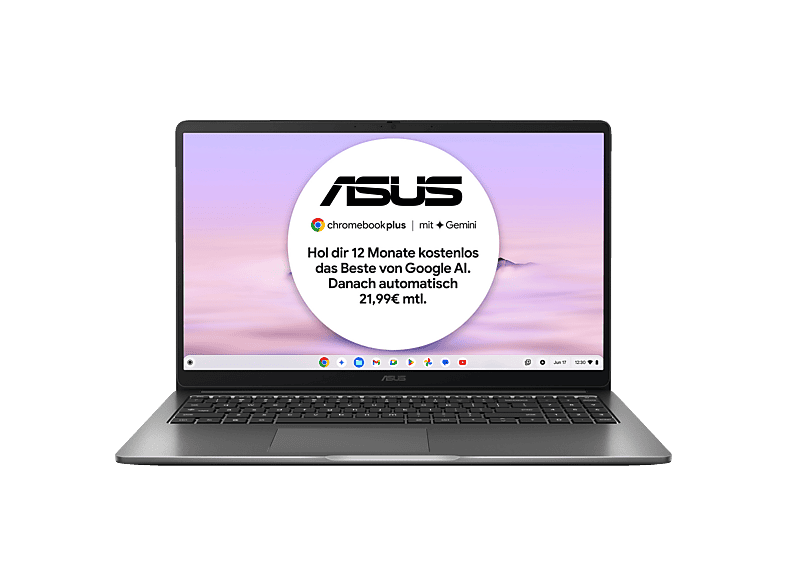 ASU·CX15ASUS CX15 CX1505CTA-S70092, Chromebook, Laptop€399±0.0%
 LEN·CHROMEBOLenovo Chromebook Chromebook Duet 11M889 (83HH000NGE)€360±0.0%
 ASU·CHROMEBOASUS Chromebook CX15 CX1505CTA-S70268 15.6 Zoll Laptop Intel€358−1.1%
 ACE·CHROMEBOAcer Chromebook 315 Notebook 15,6 Zoll 8 GB RAM Intel€359+14.3%
 HP·ELITEHP Elite 6 G2i 14 Chromebook Plus Enterprise Core 3 14"WUXGA€1,189±0.0%
 HP·CHROMEBOHP Chromebook X360 Touchscreen 14 Zoll HD 64GB 4GB RAM€300±0.0%
 ASU·CHROMEBOAsus Chromebook C436F i5-10210U 8GB 512GB 14" FHD ChromeOS€289±0.0%
 SAM·GALAXYSamsung GALAXY CHROMEBOOK GO 14 zoll 1920X1080 PIXEL INTEL€249±0.0%
 LEN·CHROMEBOLenovo Chromebook 14M8911 m G11 14 2026 Kompanio 540 4/128€250±0.0%
 LEN·CHROMEBOLenovo 300e Chromebook Gen 2 11.6" HD IPS Touch AMD A4-9120C€250±0.0%
 LEN·CHROMEBOLenovo Chromebook Duet - 11 Zoll - 128GB - 4GB RAM€180±0.0%
 ACE·CHROMEBOAcer Chromebook 315 (CB315-8H-824U) Laptop, Google ChromeOS€299±0.0%
 LEN·CHROMEBOLenovo Chromebook S345-14AST // AMD A6-9220C, 4 GB RAM€159±0.0%
 ASU·CX1400CNASUS CX1400CNA-BV0136, Chromebook, mit 14 Zoll Display€150±0.0%
 HP·CHROMEBOHP Chromebook 14a-na0209ng 14" Celeron N4020 4GB 64GB eMMC€134±0.0%
 ASU·CHROMEBOASUS Chromebook C523N | Intel Celeron | 4GB RAM | 32GB eMMC€120±0.0%
 ASU·CHROMEBOASUS Chromebook Plus CX14 CX1405CTA Laptop€499±0.0%
- ACE·CHROMEBOAcer Chromebook Plus 515| Laptop | Core i3 | 8GB | 128GB8 GB · 128 GB€359±0.0%−0.1%−0.1%
- ACE·CHROMEBOAcer Chromebook Plus 516 16,0 Zoll 8 GB RAM Intel Core 3 4,7 GHz Steel8 GB · 16.0 ″€539±0.0%+20.0%+14.4%
- SAM·GALAXYSamsung Galaxy Chromebook Plus 15,6" Core 3 8GB 256GB Neu QWERTY8 GB · 256 GB€450±0.0%±0.0%±0.0%
- ASU·CHROMEBOASUS Chromebook Flip CM1402FM2A-EC0015 14 Zoll Touch Laptop MediaTek14 ″ · MediaTek€408−1.1%−1.1%+16.6%23 d
- ASU·CX15ASUS CX15 CX1505CTA-S70092, Chromebook, Laptop8 GB · 15.6 ″€399±0.0%±0.0%−11.1%18 d
- LEN·CHROMEBOLenovo Chromebook Chromebook Duet 11M889 (83HH000NGE)ChromeOS · Chromebook€360±0.0%±0.0%±0.0%11 d
- ASU·CHROMEBOASUS Chromebook CX15 CX1505CTA-S70268 15.6 Zoll Laptop Intel N-Reihe15.6 ″ · Intel N-Serie€358−1.1%––
- ACE·CHROMEBOAcer Chromebook 315 Notebook 15,6 Zoll 8 GB RAM Intel N-Series 3,4 GHz8 GB · 15.6 ″€359±0.0%+14.3%+14.3%
- HP·ELITEHP Elite 6 G2i 14 Chromebook Plus Enterprise Core 3 14"WUXGA 8GBRAM8 GB · 14 ″€1,189±0.0%––
- HP·CHROMEBOHP Chromebook X360 Touchscreen 14 Zoll HD 64GB 4GB RAM Silber4 GB · 64 GB€300±0.0%––
- ASU·CHROMEBOAsus Chromebook C436F i5-10210U 8GB 512GB 14" FHD ChromeOS Silber8 GB · 512 GB€289±0.0%±0.0%±0.0%15 d
- SAM·GALAXYSamsung GALAXY CHROMEBOOK GO 14 zoll 1920X1080 PIXEL INTEL CELERON14 ″ · Intel Celeron€249±0.0%±0.0%±0.0%15 d
- LEN·CHROMEBOLenovo Chromebook 14M8911 m G11 14 2026 Kompanio 540 4/128 GB128 GB · MediaTek€250±0.0%±0.0%−34.6%21 d
- LEN·CHROMEBOLenovo 300e Chromebook Gen 2 11.6" HD IPS Touch AMD A4-9120C 4GB 32GB32 GB · 11.6 ″€250±0.0%––
- LEN·CHROMEBOLenovo Chromebook Duet - 11 Zoll - 128GB - 4GB RAM4 GB · 128 GB€180±0.0%––
- ACE·CHROMEBOAcer Chromebook 315 (CB315-8H-824U) Laptop, Google ChromeOS4 GB · 64 GB€299±0.0%±0.0%−14.6%
- LEN·CHROMEBOLenovo Chromebook S345-14AST // AMD A6-9220C, 4 GB RAM, 64 GB Flash4 GB · 64 GB€159±0.0%±0.0%−5.9%
- ASU·CX1400CNASUS CX1400CNA-BV0136, Chromebook, mit 14 Zoll Display14 ″ · Intel Celeron€150±0.0%±0.0%−25.0%
- HP·CHROMEBOHP Chromebook 14a-na0209ng 14" Celeron N4020 4GB 64GB eMMC Chrome OS64 GB · 14 ″€134±0.0%±0.0%±0.0%
- ASU·CHROMEBOASUS Chromebook C523N | Intel Celeron | 4GB RAM | 32GB eMMC4 GB · 32 GB€120±0.0%±0.0%±0.0%
- ASU·CHROMEBOASUS Chromebook Plus CX14 CX1405CTA Laptop | 14" FHD 16:9 IPS Display8 GB · 128 GB€499±0.0%±0.0%–
Chromebooks start in seconds, need hardly any maintenance and are often cheaper than Windows laptops. Here you can compare new and used models – plus what to look out for regarding the update period.
What a Chromebook can – and can't – do
Chromebooks run Google's ChromeOS. At their heart are the Chrome browser, web apps and Android apps from the Play Store. That's ideal for email, browser-based office apps (Google Docs, Microsoft 365 for the web), video calls, streaming and homework. Virus protection and updates run automatically in the background.
Chromebooks aren't suitable if you rely on classic Windows programs – such as certain tax, industry-specific or gaming software. Check beforehand whether a web or Android version exists for your applications.
The update expiry date is crucial
Every Chromebook only receives software and security updates up to a fixed date (Auto Update Expiration, AUE). For newer models, Google guarantees up to ten years of updates from the platform's launch. With used and very cheap devices, however, that date may already have passed or be close – in which case you shouldn't buy them. You'll find the date on Google's support page for the Auto Update policy or in the settings under “About ChromeOS”.
Chromebook Plus and specs
Google uses the “Chromebook Plus” label for devices that meet a minimum spec: among other things, a faster processor, 8 GB RAM, 128 GB storage and a Full HD display. These models offer extra features and stay smooth for longer. Basic Chromebooks with 4 GB RAM and 32 or 64 GB of eMMC storage are fine for schoolchildren and as second devices.
- Check the update expiry date before buying
- Chromebook Plus for more performance and features
- Touchscreen/convertible (“Flip”, “Spin”, “x360”) for school and stylus
New or used?
In our comparison you'll find new and used Chromebooks. Used devices from school or company stock – such as models with the suffix “EE” (Education Edition) – are often very cheap. But be sure to check the update expiry date and whether the device has been released from management (enterprise enrolment); otherwise it may not be possible to set it up for private use. New Chromebooks offer the longest update period and are therefore particularly worthwhile for children who will use the device over several school years.